Math
Algebra to Calculus
Problem Breakdown Playbook
Turn hard questions into smaller solvable chunks, then verify each step with AI explanations and self-check prompts.
Android Release
The first public Android build is available on GitHub with release notes, install details, and the launch recap.
Get Android on GitHubWeb App
The web app stays grouped with the release so visitors can launch straight into Homework Helper on any device.
Launch Web AppPlan assignments by class, sync with Google Classroom, use AI help in context, and collaborate in group projects from the same workspace.
Study Material Hub
These hand-picked learning sources pair well with Homework Helper so students can learn concepts deeply, not just finish tasks.
Math
Algebra to Calculus
Turn hard questions into smaller solvable chunks, then verify each step with AI explanations and self-check prompts.
Science
Biology, Chemistry, Physics
Use quick concept maps and summary prompts to connect formulas, diagrams, and real-world examples before quizzes.
Writing
Essays and Reports
Plan stronger introductions, thesis statements, and paragraph flow with scaffold templates and revision checklists.
Computer Science
Beginner to Intermediate
Pair AI hints with short practice rounds, debugging questions, and reflection notes to improve coding confidence.
More than a task list: this is a repeatable workflow to keep you focused from assignment intake to exam prep.
STEP 01
Add assignments once and organize by subject so nothing slips through your schedule.
STEP 02
Use voice chat to ask for examples, concept summaries, and step-by-step guidance you can understand.
STEP 03
Run short study sprints, complete one milestone, and log momentum with streak tracking.
STEP 04
Share project spaces, compare approaches, and revise together before deadlines.
As of v2.7.0
Follow the roadmap top to bottom. The 5/1 updates are grouped together so the timeline is easier to scan.
Built for actual student workflows: organize classes, execute study sessions, and stay aligned with friends and project teams.
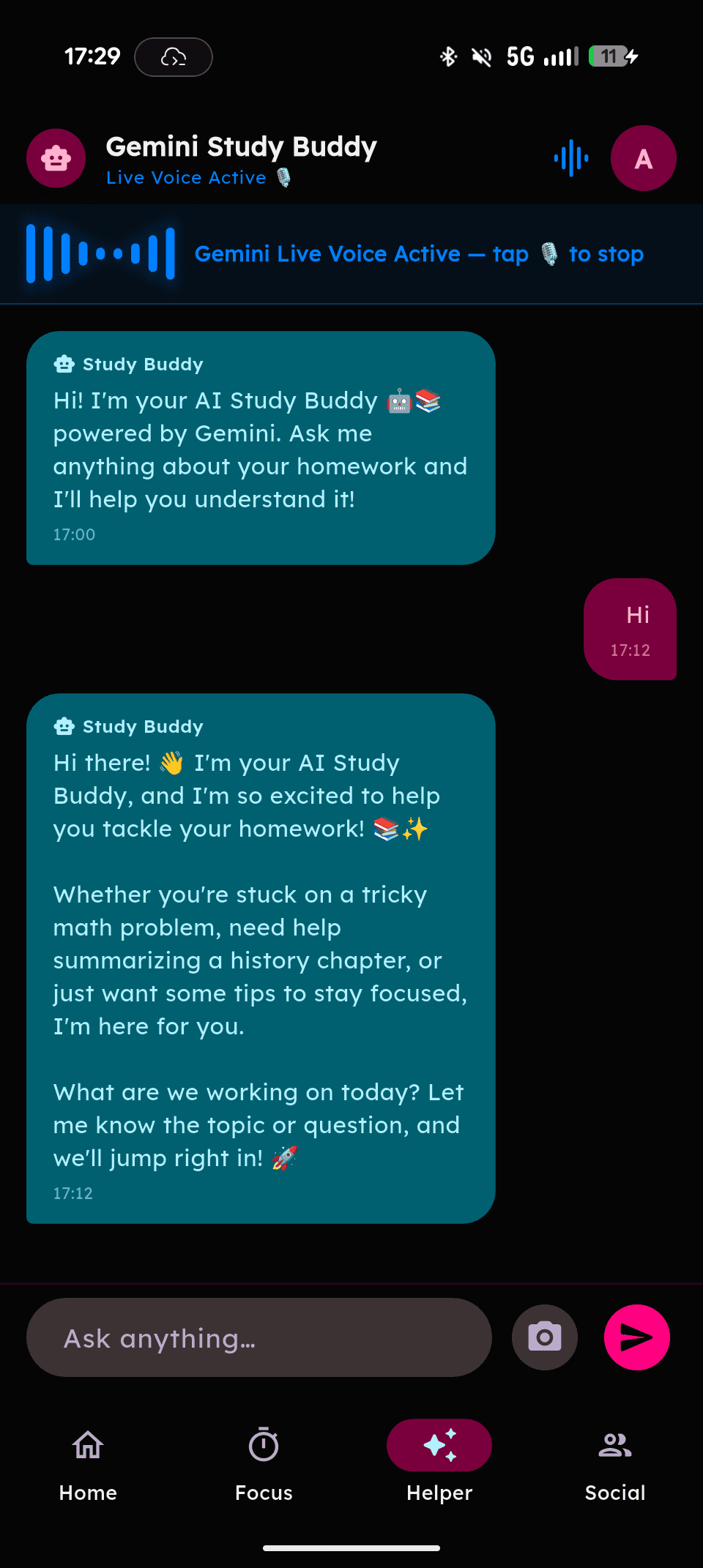
Ask questions with voice, get step-by-step explanations, and keep momentum when you are stuck on a concept.
Track pending and completed work by class and subject so deadlines are clear at a glance.
Add friends with QR or NFC on Android, then coordinate homework and project progress in one place.
Optional lock controls and account protection settings help keep your school data private.
Use repeatable study loops and streak momentum to stay consistent through heavy weeks.
Customize your workspace vibe so your dashboard feels yours on Android and web.
Run shared boards with To-do, In Progress, and Done lanes plus team bulletin posts.
Invite teammates fast with links and open directly into the right workspace context.
Sign in once and your tasks, classes, and settings stay in sync across your devices.
Start with what is due next, filter by class or subject, and jump into the exact tasks that need attention.
You don't have to wait for the App Store. Because our Web App is fully PWA-supported, you can install Homework Helper onto your home screen instantly. It runs in full-screen and feels just like a native iOS app.
Homework Helper is built transparently in the open. Whether you want to audit our security, report an issue, or contribute a new feature to help fellow students, you're welcome to jump into the code.
Search and browse by topic.
Yes. All core features, including task tracking, AI voice chat, and social collaboration, are free to use.
Homework Helper integrates with AI. Ask by voice, and get educational step-by-step responses read back with speech.
No. Assignment data is stored in Firebase for syncing your experience across devices. Study data is not sold.
Tip: If you still have a question, open an issue on GitHub and we will add it here.
Join the ecosystem where students manage assignments and master subjects with next-gen AI.
Download Latest ReleaseCrafted with ☕ and code.
Built to make studying smarter, not harder.